1. An email arrives
A customer emails you, or you request a brand-new outgoing email.
AI Email Worker
Stop spending hours writing and replying to business emails. Your AI Email Worker reads incoming emails and automatically prepares professional replies using your approved business information and instructions.
Need to send a new email? It can prepare that too. Every email stays as a draft, ready for you to check, edit, approve and manually send.
You stay in control. AI does the writing.
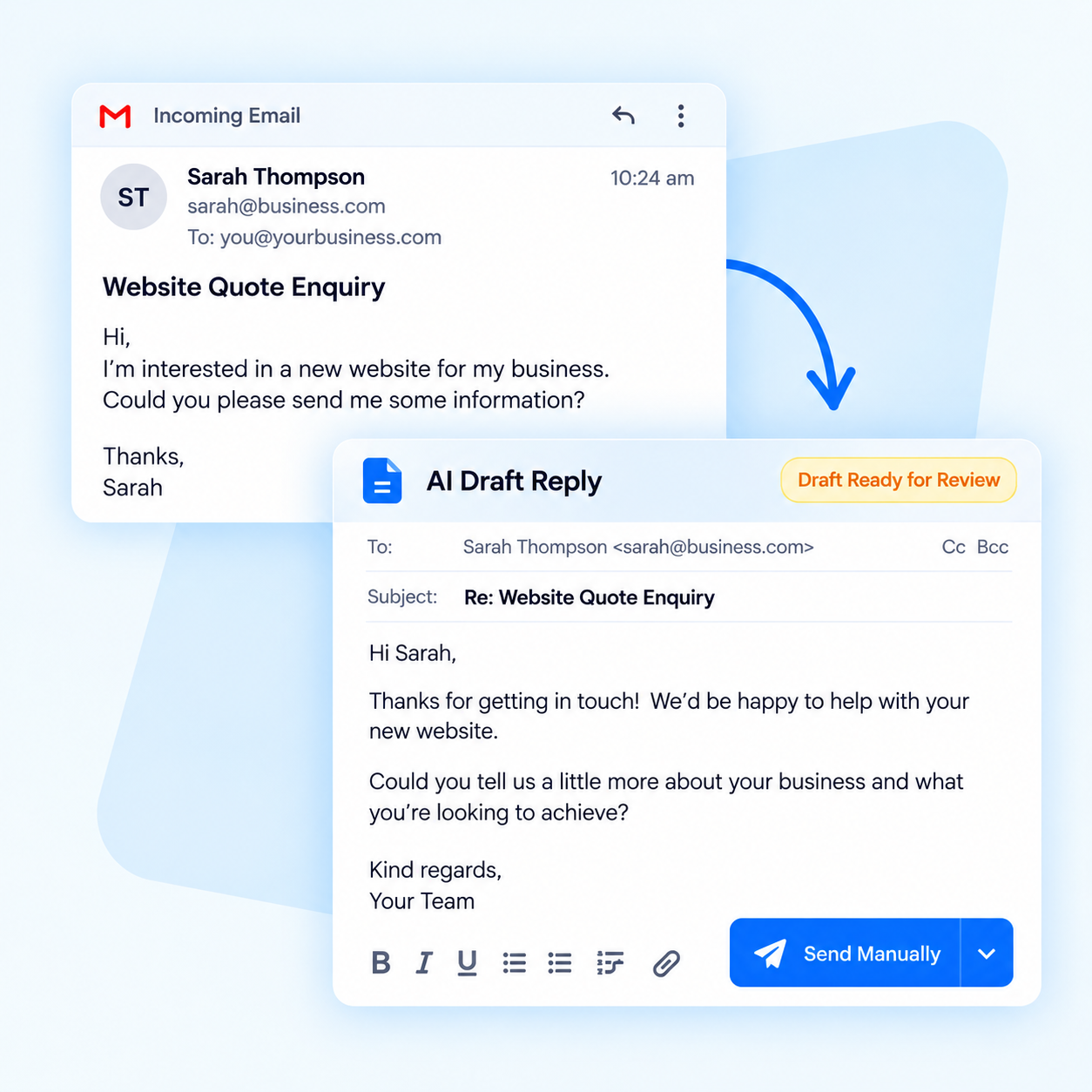
Replies and new emails are prepared as drafts instead of starting from a blank page.
Use your approved information, tone and instructions across everyday emails.
Nothing is sent automatically. You review, edit and manually send every email.

How it works
A customer emails you, or you request a brand-new outgoing email.
The worker uses your approved business information, instructions and tone.
Check the details and edit anything that needs your judgement.
The finished email stays under your control until you choose to send it.
Built for everyday business email
Use AI for the repetitive first draft while your team keeps responsibility for facts, promises, pricing and final approval.
Turn incoming enquiries and routine questions into useful response drafts.
Ask for a follow-up, introduction or update and receive a ready-to-review draft.
Base drafts on approved examples, instructions and information from your business.
Start with a complete draft and focus your time on checking the important details.
Keep common explanations and next steps clear across the team.
Drafting is automatic; checking, approval and sending remain human actions.
Questions about the AI Email Worker
No. It prepares drafts only. A person checks, approves and manually sends every email.
Yes. It can use the incoming message and your approved business information to prepare a relevant reply for review.
Yes. Give it the purpose, recipient context and any important points, and it can prepare a new draft.
Yes. Setup can include approved examples, wording preferences, information and instructions so drafts sound consistent with your business.
The suitable connection depends on your email provider and workflow. We confirm compatibility and approval points during setup.
Absolutely. Every draft is ready for you to check, change and approve before you manually send it.
Ready to spend less time writing email?
Tell us how your team handles email today and we’ll help you plan the right approval-first workflow.
Works well together
Pair this worker with a few specialists that help the next stage of the job.



Automates honest Google and Facebook review requests, optional reminders and referral follow-up.